Enable a free SSL certificate (AutoSSL, Let's Encrypt) on your site
A free SSL certificate switches your site to https://, with the padlock in the browser. On cPanel, AutoSSL issues and renews it. This article shows how to check your domain's status, run AutoSSL again and fix the cases where the certificate does not arrive.
Before you start
- You can log in to cPanel (see Log in to cPanel).
- Your domain must point to our hosting server. AutoSSL has to reach your site to prove that the domain is yours. If the domain's DNS is still with another provider, change the DNS servers first (see Change the DNS servers (nameservers) of your domain), then wait for propagation (see DNS propagation).
- The labels below (Certificate Status, Run AutoSSL) are those of the official cPanel documentation, in English; depending on your cPanel language and version, they may appear translated. Look for the button by its name or by the word “AutoSSL”.
Steps
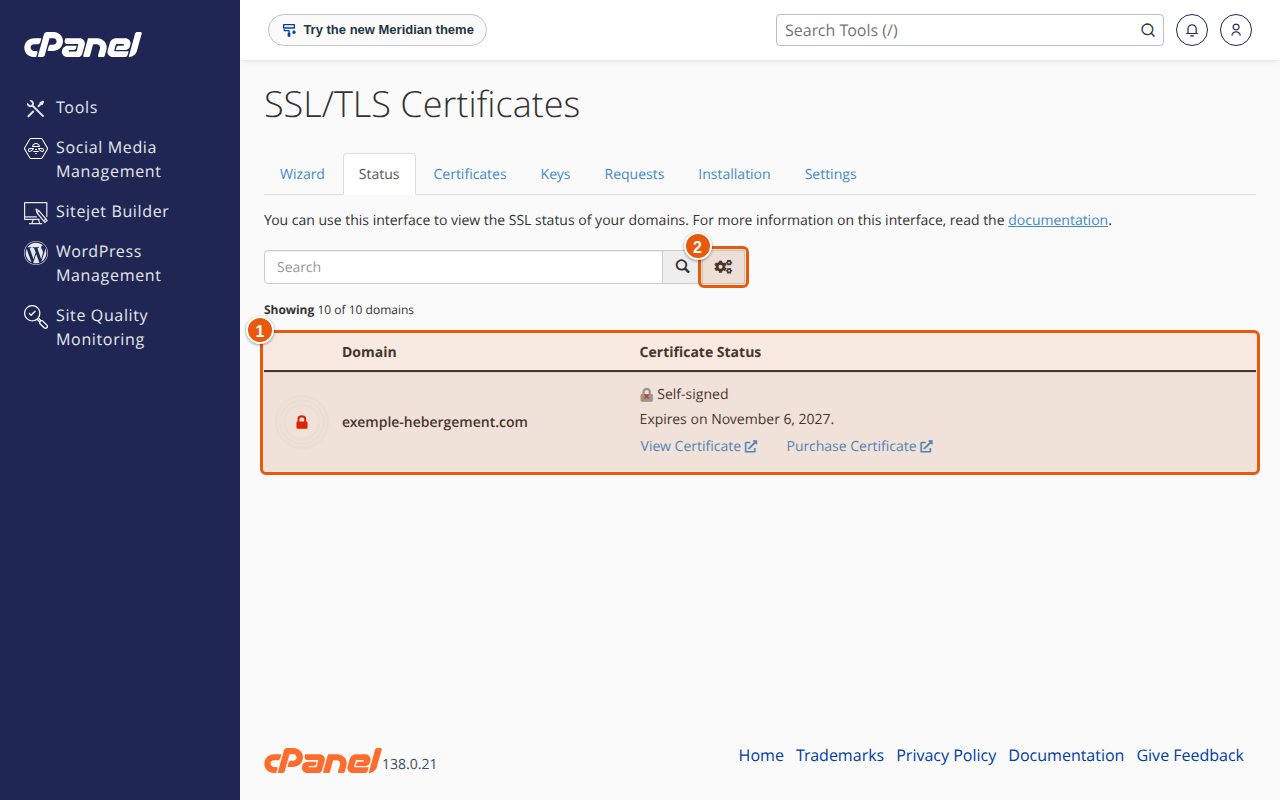
- In cPanel, open SSL/TLS Certificates (under "Security"), then the Status tab.
- Find your domain in the list (1). The Certificate Status column shows the certificate type and its expiry date. A domain that shows Self-signed is not yet protected by a recognised certificate: your visitors' browser will show a warning.
- If the domain has no recognised certificate, select it, then click Run AutoSSL. cPanel immediately runs a check and requests a certificate; the page reloads when it finishes.
- Wait a few minutes, reload the page and read your domain's line again: the certificate type should become a DV certificate issued by AutoSSL, with a new expiry date.
- Open your site at
https://and check the padlock. - To make sure visitors always land on HTTPS, add a redirect: see Redirect a page or force HTTPS: 301 redirects and .htaccess.
According to the cPanel documentation, an AutoSSL certificate is valid for 90 days, and AutoSSL tries to replace it before it expires. On our server, these free certificates are issued by Let's Encrypt.
Expected result
Your site opens at https://, with the padlock and no warning. In the Status tab, your domain shows a valid certificate and its expiry date.
If something goes wrong
- AutoSSL issues nothing and the line shows a problem. Most often the domain does not (yet) point to our server: cPanel gives the example of a domain that does not resolve to an IPv4 address on the internet. Check the DNS, wait for propagation, then click Run AutoSSL again.
- The certificate does not cover
www. Thewwwversion of the domain must also point to the hosting. Check that thewwwrecord exists in your DNS zone. - A DNS "CAA" record blocks issuance. A CAA record limits which authorities may issue a certificate for the domain. If it does not allow Let's Encrypt, change it in the Zone Editor, or remove it.
- The domain is excluded from AutoSSL. According to the cPanel documentation, the Status tab lets you include or exclude a domain from AutoSSL. Check that it is not marked Excluded.
- You installed a certificate you bought. According to the cPanel documentation, AutoSSL does not replace a certificate it did not issue itself. You then renew it by hand (see Install or renew an SSL certificate you bought, in cPanel).
- A page shows a "mixed content" warning. An image or script is still loaded over
http://: change the address tohttps://. - Nothing works. Open a support request with your domain name: see Open a support request.
Frequently asked questions
Is the free certificate as safe as a paid one?
For encrypting the connection, yes: the visitor sees the same padlock. The difference is in identity checking: a free (DV) certificate only proves that you control the domain, while an OV or EV certificate also checks your organisation. See Which SSL certificate to choose.
Do I have to renew my free certificate myself?
Not in principle: AutoSSL tries to replace it before it expires. Look at the Status tab from time to time: if an expiry date gets close with no renewal, click Run AutoSSL.
Can I get a free certificate for a subdomain?
Yes, as long as the subdomain exists in cPanel and points to the hosting (see Create a subdomain in cPanel).
When should I choose a paid certificate?
When you need an OV or EV certificate, or a "wildcard" certificate for all your subdomains: see Which SSL certificate to choose.
Related articles
- Which SSL certificate to choose: free, DV, OV, EV or wildcard
- Install or renew an SSL certificate you bought, in cPanel
- Redirect a page or force HTTPS: 301 redirects and .htaccess
A site to protect? See our security solutions.