How to change the DNS servers (nameservers) of your domain name
Changing a domain name's DNS servers means telling the registry which "nameservers" answer questions about that domain: they are the ones that say where your website and your email are. This is not about the DNS settings of your computer or your router (the "resolver"), which are used to read the Internet and which this article does not change.
Before you start
- Find out where the domain is registered (the "registrar"). If it is with us, the domain appears under Your services in your client area. Otherwise, it is in the other provider's account area.
- Write down the nameservers to use: those of your hosting, as we gave them to you. If you cannot find them, ask support from Support in your client area. Do not guess them.
- Copy your current records (A, MX, TXT, CNAME). When you change nameservers, the DNS zone in use is no longer the old one: if the new zone does not contain your email (MX) records, your email stops arriving.
Change the nameservers of a domain registered with us
- In your client area, open Your services, then the domain.
- On the Domain management card, next to Name servers, click Change.
- Type one server per line (2 to 13), for example
ns1.exemple-hebergeur.netthenns2.exemple-hebergeur.net. - Click Save.
Only contacts with technical access can see this card. If you do not see it, or if the domain is registered with another provider, open a request from Support.
Change the nameservers of a domain registered elsewhere
- Sign in to your registrar's account area.
- Open the domain's management page, then the "DNS" or "Name servers" section (the name varies from one provider to another).
- Replace the current servers with those of your hosting, one per field, then save.
Check the change
From your computer, ask which nameservers the world sees for your domain:
- Windows:
nslookup -type=NS your-domain.com - Linux or macOS:
dig NS your-domain.com +short
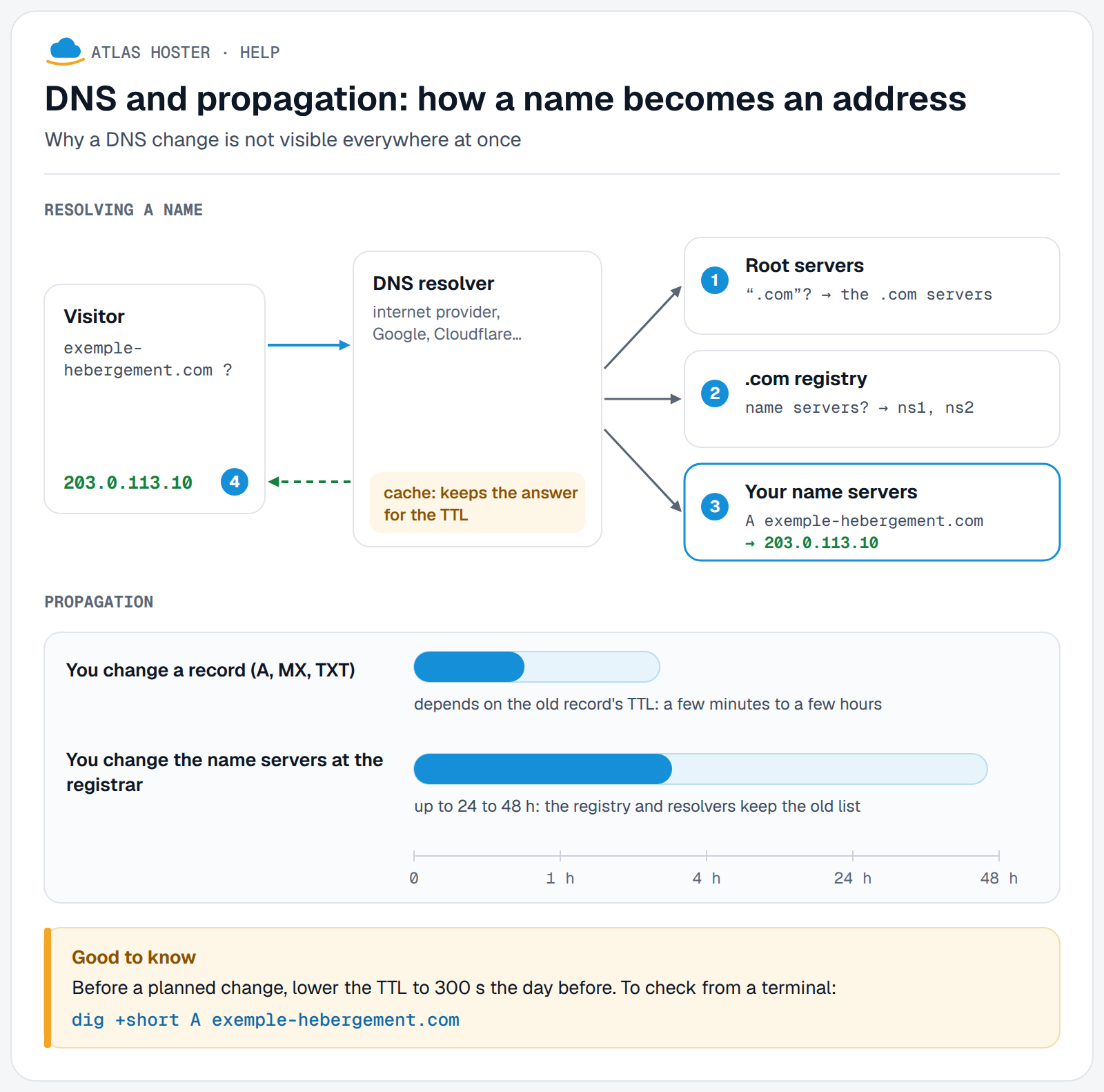
As long as the answer still shows the old servers, the change is not yet visible everywhere: see DNS propagation: how long it takes and how to check it.
Expected result
The check command shows your new nameservers, and your website opens from your hosting. Because of caches, the switch is not instant: some visitors still see the old site for a while.
If something goes wrong
- The site still shows the old content. DNS caches keep the old answer until it expires: wait and check as above.
- Email no longer arrives. The new zone does not have your MX records. Add them to the DNS zone that now applies.
- The domain "stops answering" although DNSSEC was on. Before changing nameservers, first remove the DS record (on the Domain management card), wait a day, then turn off DNSSEC at the old DNS host. In the other order, the domain may stop resolving.
- Your domain is managed in Cloudflare. Its nameservers are then Cloudflare's: edit the records in Cloudflare, and only change nameservers if you want to leave Cloudflare.
- The "Change" button is missing. Your access does not include the technical right, or the domain is with another registrar: write to us from Support.
FAQ
What is the difference between changing DNS servers and editing a DNS record?
Nameservers say who holds your domain's DNS zone. A record (A, MX, TXT…) is a line inside that zone. To point a domain to a new hosting, you can either change the nameservers, or keep yours and edit the A record.
Will my site and email stop during the change?
Not necessarily, provided the new zone already holds all your records before the change. That is why you copy them first: without that, the site or email may be interrupted.
Do I have to transfer the domain to change its DNS servers?
No. The domain stays with its registrar: only the nameservers change.
How many nameservers should I enter?
At least two, so the domain keeps answering if one of them is unavailable. Our client area accepts from 2 to 13 servers.
Can I speed up propagation?
No, it depends on internet providers' caches. Clearing your own computer's cache only changes what you see.