My emails land in spam at the recipient: what to do
When your messages end up in the recipient's spam folder, it is almost never chance: their mail service has doubts about the sender. This guide goes through the causes in the order in which it is quickest to rule them out.
Before you start
- Note three things: the address you write from, the address of the recipient who gets it in spam, and whether the problem affects all recipients or a single service (for example only Gmail).
- If possible, ask the recipient to open a message that landed in spam and send you its full headers. In Gmail: open the message, then menu More › Show original.
- You can log in to cPanel (see Log in to cPanel).
Steps
Check your domain's authentication. In cPanel, open the Email section, then Email Deliverability. If your domain is flagged with a problem, fix it: it is the most frequent cause (see Set up SPF, DKIM and DMARC). Google requires at least SPF or DKIM from all senders, and DMARC from those who send more than 5,000 messages a day to its addresses.
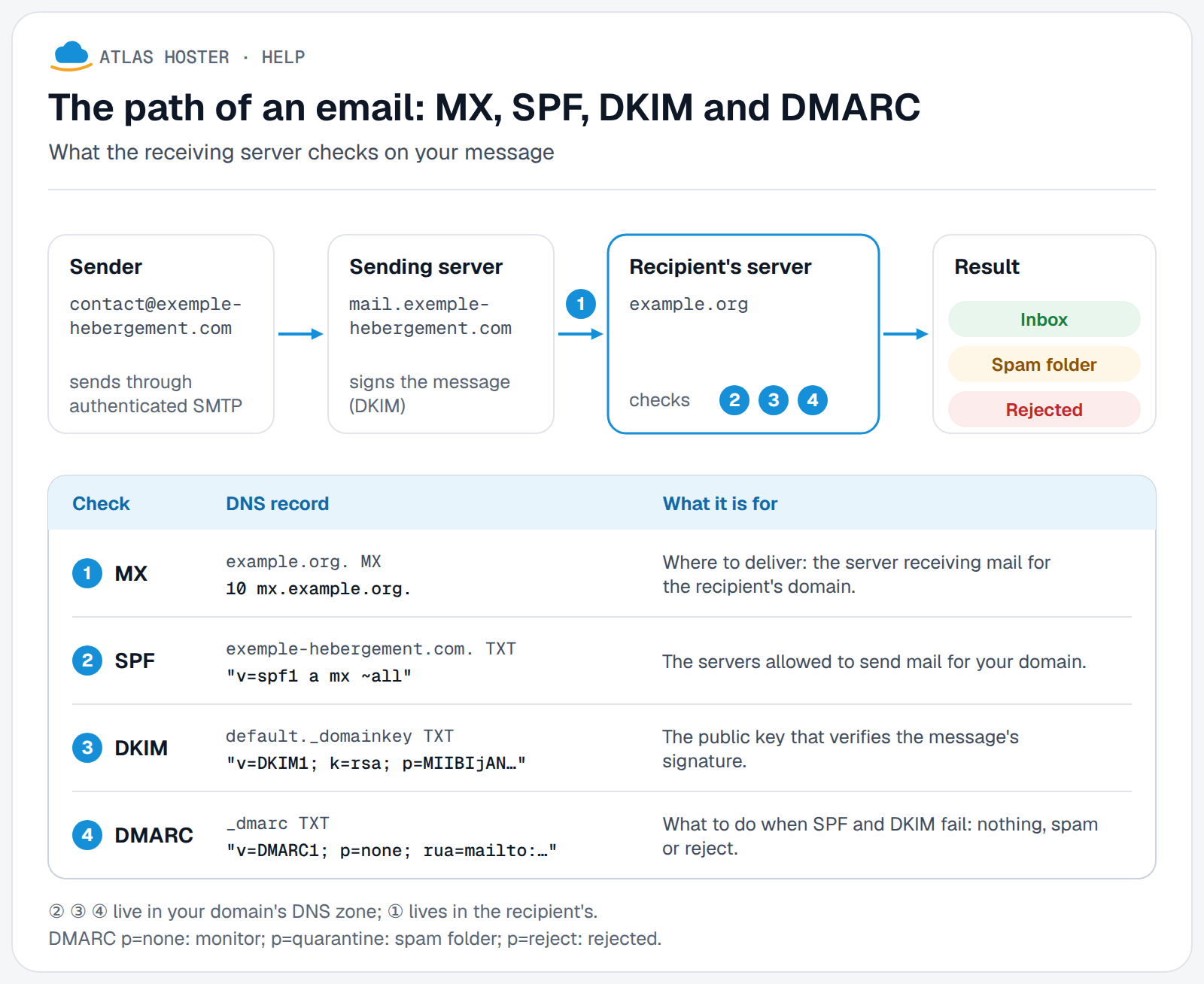
Send through your hosting's server. In your mail program, the outgoing server (SMTP) must be
mail.your-domain.com, port 465 (SSL/TLS) or 587 (STARTTLS), with authentication and the full email address as the username (see IMAP, POP and SMTP settings). A message sent through another provider's server with your address as the sender fails SPF and DKIM.Look at what cPanel knows about your sends. Open Track Delivery in the Email section. For each message, the Spam Score column gives the anti-spam score and the Result column the outcome of the delivery. An icon for "rejected at SMTP time" can mean that the sending server is on a blocklist: in that case, contact us and include the error message.
Check the content and the audience. Only write to people who want to hear from you, avoid misleading subject lines, and for bulk sends add an easy way to unsubscribe. Google asks that the reported spam rate stay under 0.3%.
Check that no account is compromised. In Track Delivery, look for sends you did not make. If there are any, change the mailbox password right away (Email Accounts › Manage) and contact us.
Ask the recipient to trust you. In Gmail, they open the Spam folder, select the message and click Not spam. Adding your address to their contacts also helps. This settles their case, not the other recipients': fix the cause.
Expected result
A test message sent to a Gmail address reaches the inbox, and its headers (Show original) show that SPF, DKIM and DMARC are valid. The effects on reputation take time: a domain that has just been fixed may stay under watch for a while.
If something goes wrong
- You have just created the domain or the address: a domain with no history is judged cautiously. Start with normal exchanges with real correspondents, with no mass sending.
- Only one service (Gmail, Outlook…) puts it in spam: that service has doubts. Read its sender requirements (Google's are published in its help for senders) and send it a test message.
- Messages sent by your website's form land in spam: the site must send with an address from your domain, and DKIM may not be verified for messages sent by a PHP script. Contact us.
- Everything is green in Email Deliverability but the problem remains: send us the full headers of a message that landed in spam, with the send time, and we will look into it with you.
Frequently asked questions
Why do I only get spam placement with one recipient?
Each mail service has its own rules. If only one recipient is affected, the problem often comes from their personal filter: ask them to add you to their contacts and to mark your messages as "Not spam" (or the equivalent in their mail service).
Are SPF, DKIM and DMARC enough to avoid spam?
They are necessary but not sufficient: they prove who you are, not that your messages are wanted. Reputation, content and the quality of your recipient list matter too.
Should I wait after a fix?
A new DNS record takes some time to be seen everywhere (see DNS propagation). Try again afterwards.
Are my messages rejected or just put in spam?
A message put in spam is delivered to the junk folder; a rejected message produces a failure notice that you receive. Track Delivery shows both cases.
Can my address be on a blocklist?
Yes, and that is another possible cause: for a rejection at SMTP time, cPanel recommends checking the server's IP address against a real-time blocklist. Contact us with the error message.
Related articles
- Set up SPF, DKIM and DMARC for your domain
- IMAP, POP and SMTP settings for your mailbox
- Block a sender and filter your emails
Need an email address on your own domain name? Discover our business email plans.