Create a business email address in cPanel
A business email address looks like contact@your-domain.com instead of a free webmail address. You create it in about a minute in cPanel, with its own password and its own storage space.
Before you start
- Your domain is attached to your hosting and you can log in to cPanel (see Log in to cPanel).
- You have chosen the mailbox name (the part before the
@) and a strong password that you do not use anywhere else. - The number of addresses you can create depends on your plan. cPanel shows it at the top of the Email Accounts page.
Steps
- In cPanel, open the Email section, then Email Accounts.
- Click Create. The creation form opens.
- If your hosting holds several domains, pick the address's domain in the Domain list. With a single domain, the list does not appear.
- Type the mailbox name in the username field (for example
contact). It cannot exceed 64 characters, and the full address cannot exceed 254. The namecpanelis refused. - In the Password section, choose one of two options:
- Set password now.: type a password, or click Generate to have one created. The eye icon shows it so you can note it down.
- Send login link to alternate email address.: cPanel sends a link to another address so that the person can choose their own password. This option only appears if your hosting provider has enabled it.
- Under Optional Settings, adjust if needed:
- the mailbox's storage space: a custom size, or Unlimited for no limit;
- automatic folder creation for plus addresses (
contact+invoices@your-domain.comfiles the message in aninvoicesfolder); - a welcome email that contains the instructions for setting up a mail client.
- Click Create. Tick Stay on this page after I click Create beforehand if you want to create another address right away.
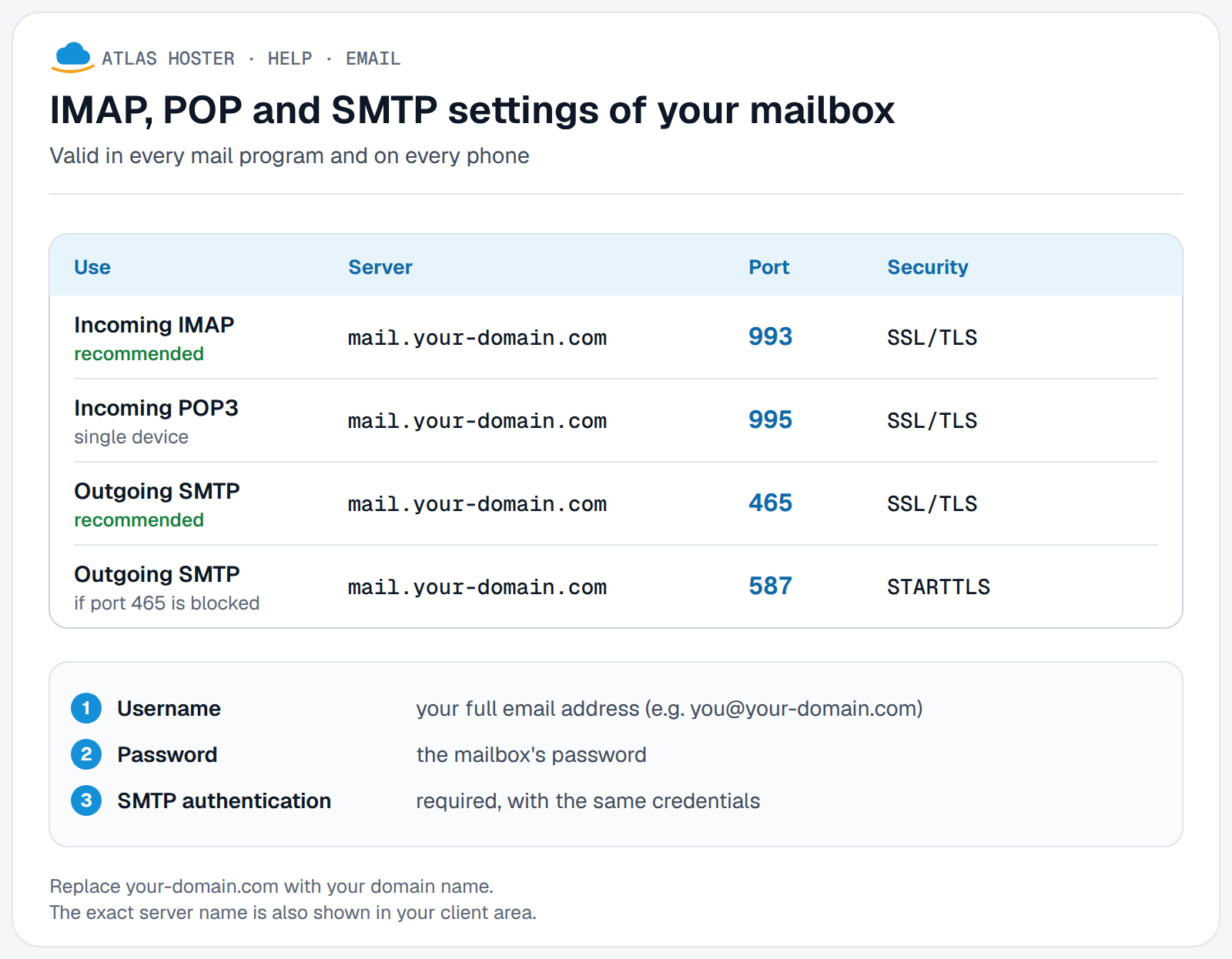
To use the mailbox on a computer or a phone, the settings are the same for everyone:
Expected result
The new address appears in the table of the Email Accounts page, with its used and allocated space. Next to it, three actions:
- Check Email opens the webmail of that address (see Log in to webmail);
- Manage changes the password and the storage space;
- Connect Devices shows the settings to enter in a mail program or on a phone (see IMAP, POP and SMTP settings).
If something goes wrong
- The password is refused: cPanel asks for a stronger password (message Enter a stronger password). Make it longer, mix upper and lower case, digits and symbols, or use Generate. Some hosting providers enforce a minimum strength.
- The domain list is missing: your hosting holds a single domain, which is normal. To add a domain, click Manage Domains.
- The Create button is greyed out, or cPanel says you have reached the maximum number of accounts: you have created all the addresses in your plan. Delete an unused address or contact us to add more.
- The domain is a temporary one: cPanel does not handle email for a temporary domain. Attach your real domain name to the hosting first.
- You want to rename an existing mailbox: this is not possible, an address cannot be renamed. Create the new address, then forward the old one to it.
- You deleted an address by mistake: deleting permanently erases every message in the mailbox, and cPanel offers no way back.
Frequently asked questions
What is the difference between an email account and a forwarder?
An email account is a real mailbox: it stores messages and is protected by a password. A forwarder stores nothing and sends messages on to another address (see Forward an email address).
Which username do I use to log in to my mailbox?
The full email address, for example contact@your-domain.com, with that mailbox's password. It is not your cPanel account login.
Can I limit the size of a mailbox?
Yes. Under Optional Settings, enter a custom size instead of Unlimited. You can change it later with the Manage button.
How do I change an address's password?
In Email Accounts, click Manage next to the address, type the new password in the New Password area, then save. If you forgot the cPanel password itself, see Forgot your cPanel, webmail or FTP password.
Where do I read my email?
In webmail with Check Email, or in a mail program such as Outlook using the IMAP settings in IMAP, POP and SMTP settings.
Related articles
- IMAP, POP and SMTP settings for your mailbox
- Log in to webmail (Roundcube)
- Forward an email address to another one
- Create an autoresponder (out-of-office message)
- Set up your email address in Outlook
Need an email address on your own domain name? Discover our business email plans.