Create additional FTP accounts in cPanel
An additional FTP account lets a contractor, a colleague or a tool upload files to your hosting without knowing your cPanel account's password. You choose the folder it can reach, and you can delete it at any time.
Before you start
- Have your cPanel credentials ready: see Log in to cPanel.
- Decide which folder this account should reach. It will be able to read and write in that folder and all its subfolders, but not above it.
- The FTP Accounts screen is only available if your hosting provider has enabled FTP for your account. Otherwise, use the File Manager.
- The labels below come from cPanel's official documentation, in English; the French version of your cPanel may translate some of them.
Steps
Create the account
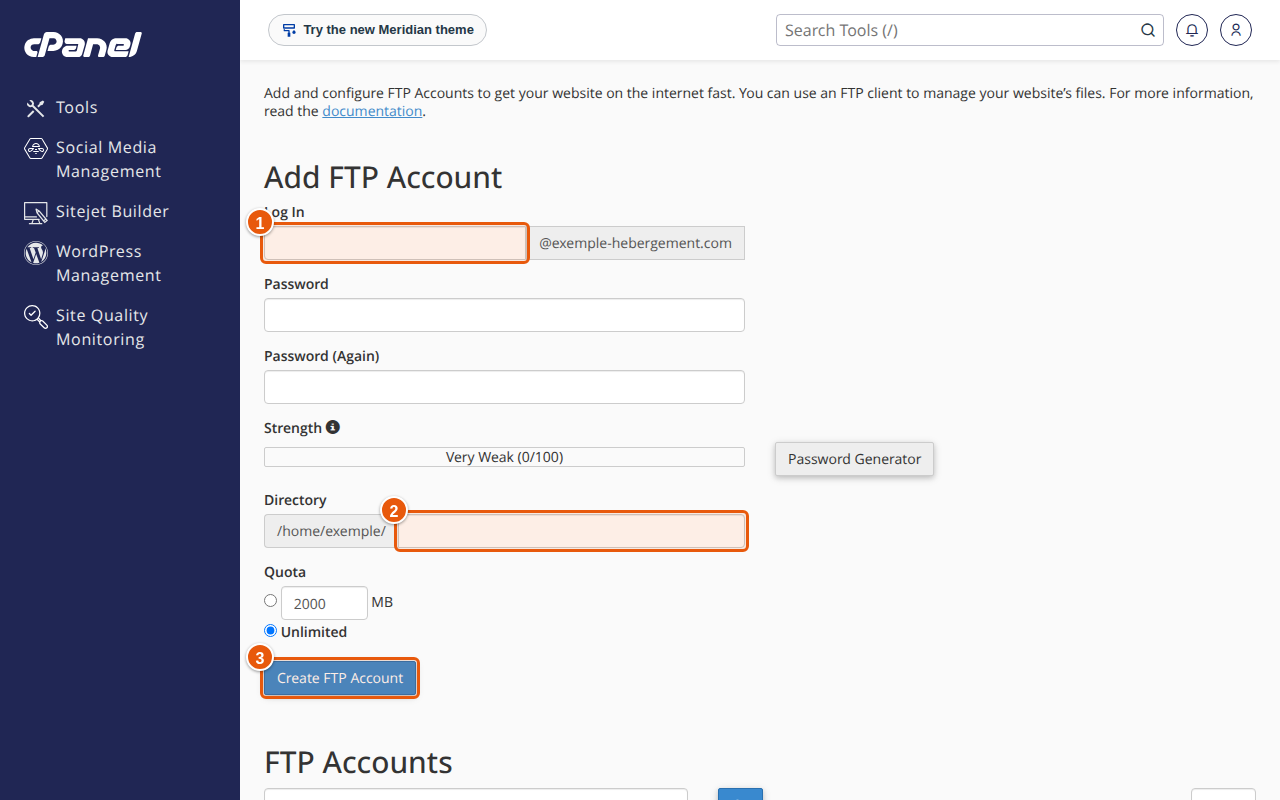
- In cPanel, open Files › FTP Accounts.
- In the Add FTP Account area, enter the username in Log In.
- In the Domain menu, choose the account's domain.
- Enter the password in Password and Password (Again). Password Generator suggests a strong one. Keep it in a password manager.
- In Directory, enter the account's folder. cPanel pre-fills
public_html/domain.tld/username. If you enterexample, the account reaches/home/user/example/and its subfolders. To limit a contractor to a single site, enter that site's folder. - Set the account's maximum space in Quota, or tick Unlimited. If this account's uploads fail, you may have to raise the quota.
- Click Create FTP Account. The account appears in the FTP Accounts table.
cPanel states that symbolic links cannot be used to upload data outside the account's folder.
Pass on the credentials
The person who receives the account connects with FTP or SFTP software. According to cPanel:
- the username to enter is the full username, as in
username@domain.tld, with the password you chose. Only a cPanel account that has a dedicated IP address can use its plain cPanel username; - for an encrypted connection, the server to enter is the server's hostname, not your domain name: FTP does not support SNI, the technology that picks the certificate according to the domain.
The server hostname and port to use depend on your hosting: if you do not have them, ask support. Send the password through a safe channel, never in the same message as the username.
Manage existing accounts
In the FTP Accounts table:
- Change Password: enter the new password twice, then click Change Password.
- Change Quota: enter the new space (or Unlimited), then click Change Quota. This action does not exist on a server that uses ProFTPD, where quotas are not possible.
- Configure FTP Client: downloads a configuration file for Core FTP or Cyberduck, which set themselves up.
- Delete: choose Delete Account to remove only the account, or Cancel.
Expected result
The account appears in the list. When the person connects with their full username, they only see the folder you chose, and can upload, edit and delete files in it.
If something goes wrong
- "Login incorrect": check that the username is complete (
username@domain.tld) and the password is exact. Change it with Change Password if in doubt. - Uploads fail: the account's quota may be reached, or the cPanel account's space is full (see Disk space full in cPanel). Raise the quota with Change Quota.
- The account sees too much, or not enough: the chosen folder is probably wrong. The table does not offer to change an existing account's folder (only its password and quota): delete the account with Delete Account (without the files) and recreate it with the right folder.
- The encrypted connection shows a certificate warning: use the server's hostname and not your domain, as explained above.
- Only the first 10,000 files of a folder show up: on a server that uses Pure-FTPd, cPanel states that the listing is limited to 10,000 files per folder; your hosting provider can adjust this value.
FAQ
What is the difference with the main FTP account?
The main FTP account is created by default with the cPanel account: it reaches all the account's files, including outside public_html, and cPanel recommends using it over SFTP. It cannot be changed or deleted from this screen. An additional account is limited to one folder.
How many FTP accounts can I create?
It depends on your hosting: the number of FTP accounts is one of the limits set for your account. If creation is refused, contact support.
Is FTP safe?
To upload files over an encrypted connection, prefer SFTP when available, or encrypted FTP with the server's hostname. A folder-limited account reduces the damage if a password leaks, but does not replace a strong password.
What should I do with the account when the contractor is done?
Delete it with Delete Account. The uploaded files stay in place, but access is cut.
Related articles
- Use cPanel's File Manager
- Log in to cPanel: address, credentials and a tour of the interface
- cPanel, webmail or FTP password lost: reset or change it
- Disk space full in cPanel: find what takes up space
A site to publish? Discover our web hosting plans.